¶ In-Game Assistance
If you are needing assistance in-game, you can view which staff are online by using /staff. You will be able to click on their name to send them a message, or use the /msg command.
If no staff members are actively online in /staff, you may visit our Discord server for assistance.
¶ Discord Assistance
The Snapcraft Discord server provides multiple options to receive assistance from our Staff team or community!
The 'Support' category has three channels available to receive the assistance you need.
- #faq - A list of frequently asked questions and their answers.
- #staff-help - @Staff in this channel with your question or issue to receive assistance.
- #create-ticket - Create a ticket on Discord for our staff team to handle.
¶ Discord Tickets
Discord tickets can be found in the #create-tickets channel under the 'Support' category. There are multiple different categories to choose from based on your issue.
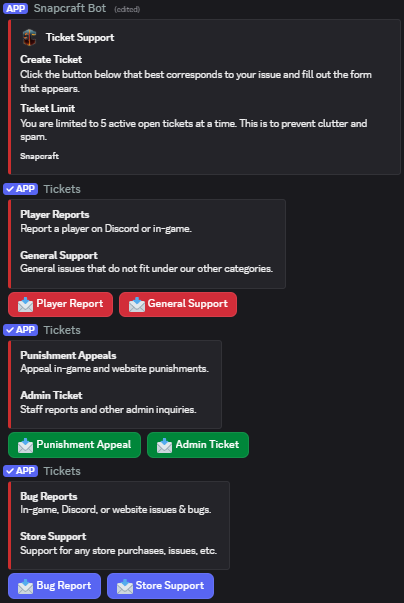
When you select a department to create a ticket under, it will show a form we created. Please answer all questions in detail to receive the best support. Each form varies based on the ticket category. Please remember that you can only have a total of 5 tickets open at a time.
Once your ticket has been submitted, it will create a thread with the ticket information and a staff member can join the thread to handle it. Please do not ask staff to handle your tickets, it will be handled when there is time.
¶ Other Options
You may email [email protected] however, it may have slower response times. This is typically only used for more serious or complex inquires. This is currently the only point of contact for users who do not use Discord.