 Discord Invite Invite to the official Snapcraft Discord
 Discord Rules Snapcraft Discord rules - Also available in the #rules-n-roles channel in our discord
NOTE: If you feel this page is missing information, please reach out to staff in the #staff-help channel on our Discord.
¶ Channel Categories
- Information - All channels used for official announcements, updates, community feedback, etc.
- Support - All channels used for any questions, concerns, or feedback.
- Community - All channels are community based and intended for community engagement.
- Voice - All channels are voice chats including public, private, and music lounges.
¶ Discord Roles
There are a variety of roles available in our Discord. Below will describe their purposes and how they may be obtained.
¶ Announcement Roles
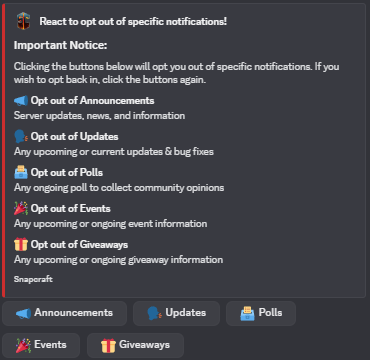
Upon joining our Discord, you are given 5 notification roles to receive pings for our announcements.
You may opt out of these pings by removing the roles in #rules-n-roles channel in our Discord. If you wish to receive notifications for specific announcements again, click the buttons again.
¶ Counting Milestone Roles
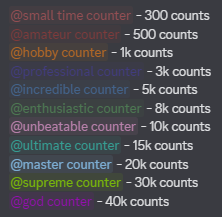
To encourage and reward you for your progress in the #counting channel, you can earn milestone roles! Below is the order in which they can be earned and the requirements.
¶ Useful Commands
- Use
/userin #commands-chat to view your score in counting.
Alternatively, you can do/score (name)to view another users counting score. - Use
/leaderboardin #commands-chat to view the server leaderboard.
Didn't earn your role? Tag @Staff in the #staff-help channel on our Discord!
¶ Level Roles
To encourage and reward you for engaging in our server, you can level up as you chat! Leveling up earns you a new role with cool colors and it displays you higher on the member list. You receive a new role every 5 levels until you each level 100!
XP to level up is earned by sending messages in our channels. We allow you to earn XP at a 1x rate which means the bot awards a random amount of XP between 15 and 25 for each message sent. You can only gain XP once per minute to prevent spamming.
¶ Useful Commands
-
Use
/rankin #commands-chat to view your own level and progress.
Alternatively, you can do/rank (name)to view another users level and progress. -
Use
/levelsin #commands-chat to receive a link to the server leaderboard to see where you place.
¶ Nitro Booster Role
Users with Discord Nitro can boost our Discord server to receive the Nitro Booster role.
Why boost our server?
- Gain the ability to post pictures outside of #banter-n-memes
- Gain the ability to send external emojis and stickers
- Be displayed above all level-based roles
- Gain access to any booster exclusive giveaway
How does your boost help us?
Boosts help Discord servers in a number of ways!
- Allows us to add more emojis and stickers for you guys.
- Gives us access to an animated server icon, server banner, custom role icons, custom server invite link, and an animated server banner to keep our server looking fresh!
- Gives all of our members better quality audio, streaming and bigger file uploads in our server!
Plus, you're just showing your support with your boost. We appreciate all of our Nitro Boosters.
¶ Content Creator Roles
The Media role is given to players who have applied for the role and intend to create content for our server. This may be a partnership or a voluntary agreement.
¶ Giveaway Sponsor Role
Sometimes players wish to give back to the community by sponsoring a giveaway. We allow you to do so, just contact an Admin directly or another staff member who will then get an Admin for you.
You may have to surrender the product for the giveaway and agree to certain terms before sponsoring a giveaway.
Once you have successfuly sponsored a giveaway, you will receive the Giveaway Sponsor role to recognize your kindness!
NOTE: If you do not want this role, contact a staff member to have it removed.
¶ Staff Roles
All staff members have specific roles in our Discord to identify their position on our server.
Our main staff positions are: Owner, Admin, Dev, SrMod, Mod, Helper, and Builder.
We have sub-team roles that our staff members can obtain as well. These roles are: Staff Manager, Media Manager, Appeal Team, Mentor Team, Media Team, Report Team, and Event Team.
 Staff Team Meet our staff team
Additionally, staff members may take a break from their duties for a certain period of time. Upon doing so, they can obtain the On Break role in Discord. They are not required to fulfill staff duties while holding this role.
You can apply for the Helper and Builder positions only. These roles is not Discord exclusive, it applies across our entire network.
Once you apply for staff, if you make it past the review stage and we invite you to an interview, you will receive the Applicant role in Discord. This role is kept until you pass or fail the interview.
 Staff Applications Application guidelines & how to apply
¶ Discord Tickets
Discord tickets can be found in the #create-tickets channel under the 'Support' category. There are multiple different ticket departments to choose from based on your issue.
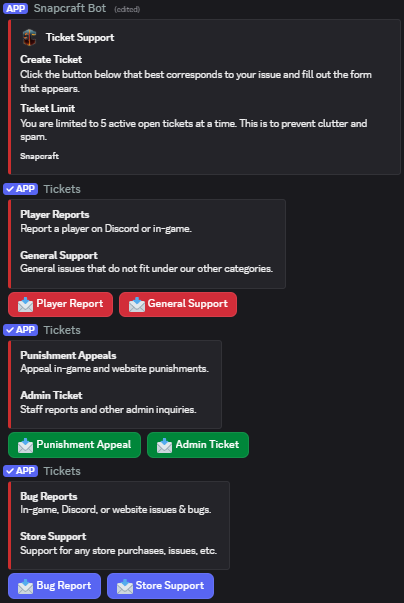
When you select a department to create a ticket under, it will show a form we created. Please answer all questions in detail to receive the best support. Each form varies based on the ticket category. Please remember that you can only have a total of 5 tickets open at a time.
Once your ticket has been submitted, it will create a thread with the ticket information and a staff member can join the thread to handle it. Please do not ask staff to handle your tickets, it will be handled when there is time.
¶ Follow Channels
Most of our channels in the 'Information' category are announcement channels. This means you have the option to follow the channel allowing you to have all posts from that specific channel forwarded to your own server.
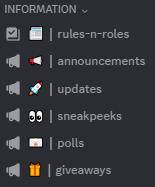
To follow a channel, just click on that channel and located beside the channel title will be a 'Follow' button. Click this button and select the server and channel you wish to send the posts to.
To unfollow a channel, go to Server Settings of the server you selected > Integrations > Channels Followed. Click on the desired channel and there will be an 'Unfollow' button.